What changed
If a text does not go through, Sellify tries the customer's next number. If none works, your office gets a task. The customer gets the same message they would have received on the first number.
What your office sees
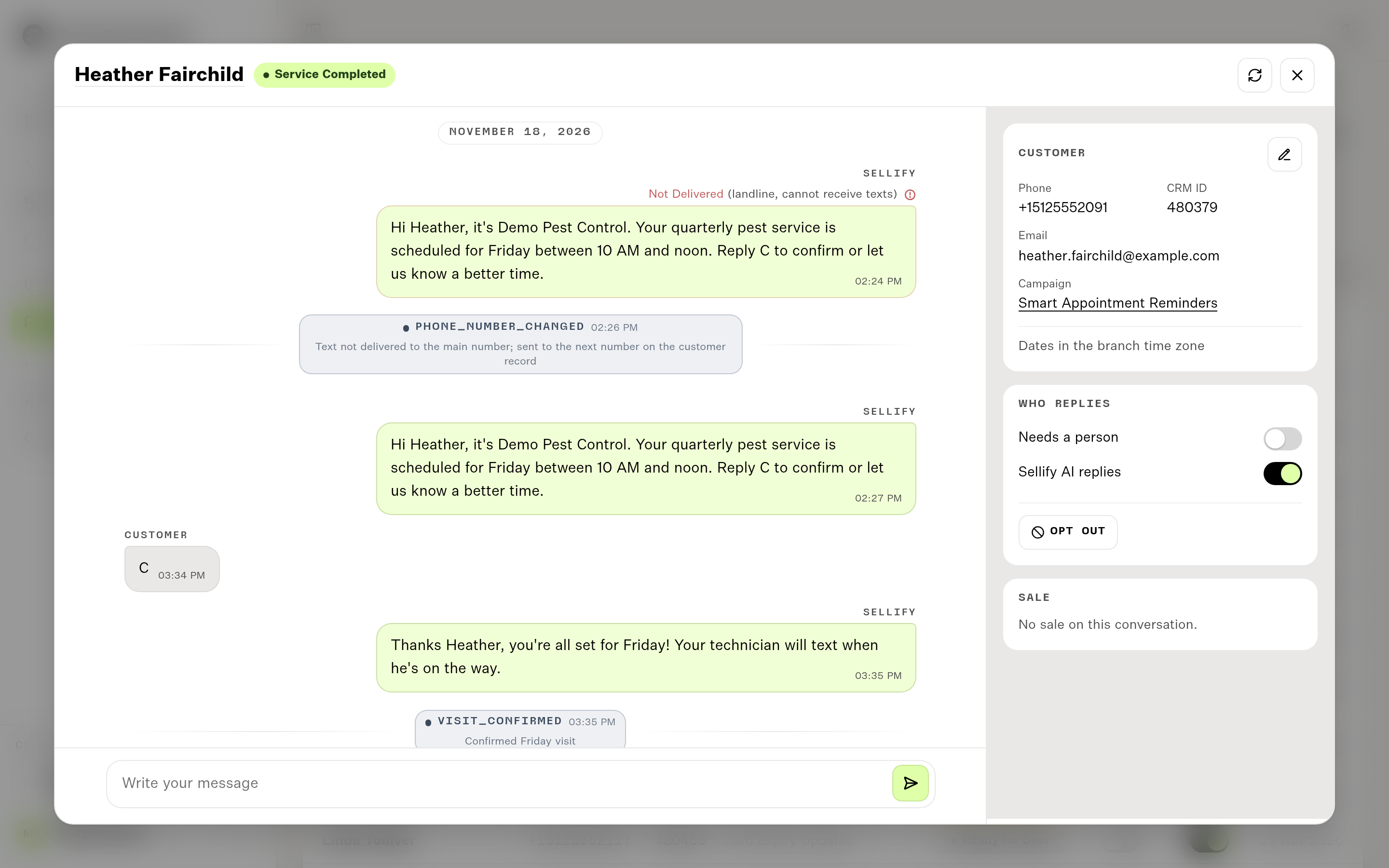
- 1Not Delivered: the first text did not go through, because the number is a landline.
- 2The number changed event: the text was not delivered to the main number and was sent to the next number on the customer record.
- 3The same text, sent again.
- 4The customer replied C, and the visit was confirmed.
If no number works, a task appears in Customer Success > Tasks, a sign the customer has no reachable number on file. That is your cue to update the record or pick up the phone.
Why it matters
A reminder that never arrives is a visit nobody confirmed. An offer that never arrives is a sale nobody had a chance to make. Fewer customers fall silent because of one bad number, and your office hears about the rest.
Read more on the next phone number page, and see how Tasks and Smart Reminders use it. For the office side, see appointment reminders customers answer.
Part of the Office and customer service hub.
Have feedback? Reply to your monthly "New in Sellify AI" email. Any reply reaches Sellify's leadership.
Already a client? Ask your account manager.
Sources
- Sellify AI product documentation