What it does
It only tries numbers already on the customer's record in your CRM. It starts with the main number and moves to the next one when a text does not go through.
How it works
- Sellify uses the phone numbers on the customer's record in your CRM.
- If a text does not go through, Sellify tries the customer's next number.
- If none works, your office gets a task in Customer Success > Tasks.
What your office sees
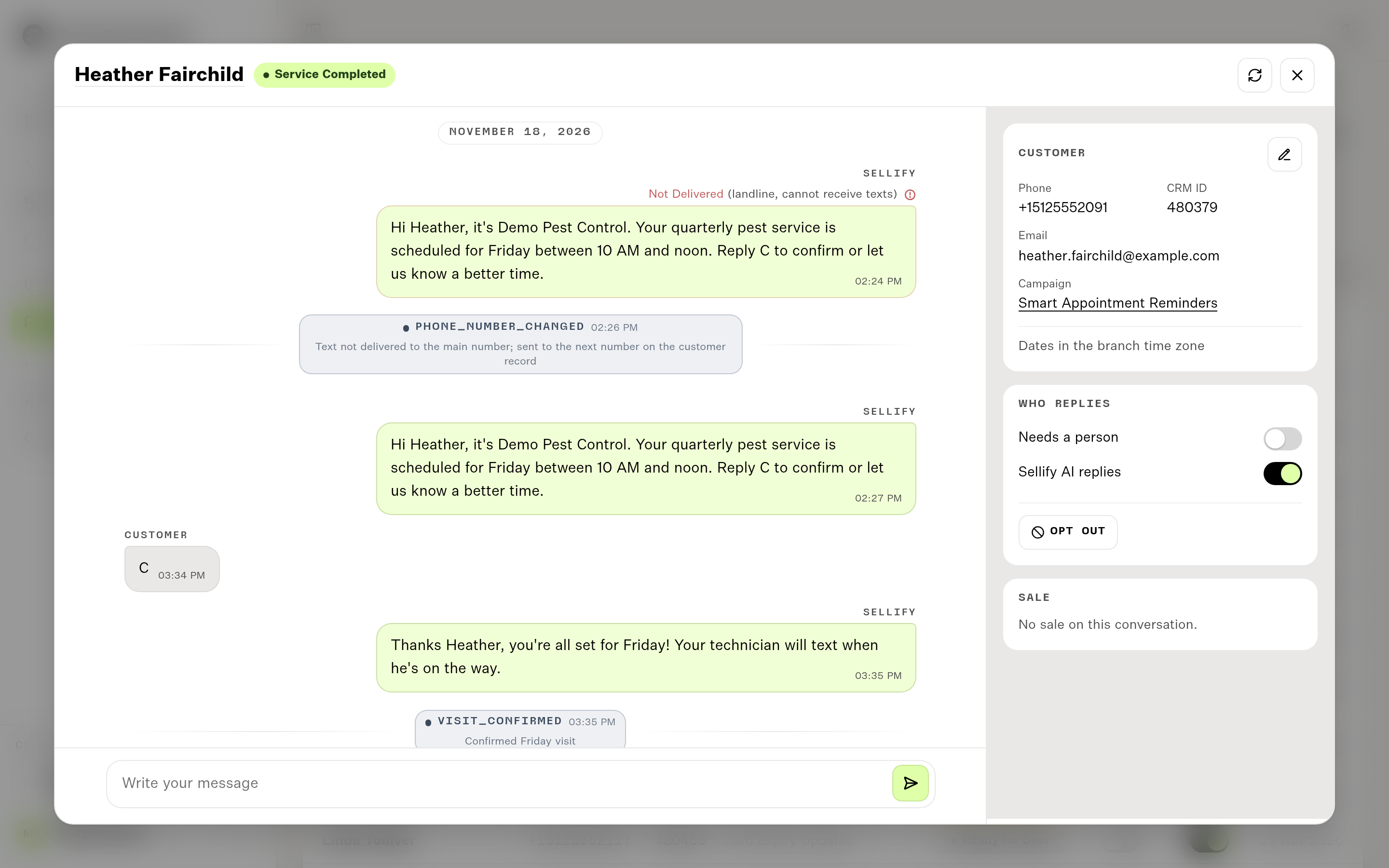
- 1Not Delivered: the first text did not go through, because the number is a landline.
- 2The number changed event: the text was not delivered to the main number and was sent to the next number on the customer record.
- 3The same text, sent again.
- 4The customer replied C, and the visit was confirmed.
If no number works, a task appears in Customer Success > Tasks. That is your signal that the customer has no reachable number, so update the record or pick up the phone.
What the customer sees
The same message, on a number they actually read. Nothing in the text mentions the failed attempt.
What you control
The numbers come from your CRM, so the control that matters most is clean phone data: a mobile number on the record where the customer has one, and old numbers removed.
What stays with your team
Customers with no reachable number. The task tells you who they are, and your office decides whether to call, email or update the record.
Related
- Update: Texts reach the customer's next phone number
- Conversations
- Customer Success Tasks
- Smart Appointment Reminders
- Guide: Pest control appointment reminders customers answer
- Back to Office and customer service and the pillar guide AI for pest control companies
Questions
Which numbers does Sellify use?
What happens if no number works?
Does the customer get a different message on the second number?
Does it work with my CRM?
Sellify AI does this texting and call answering for pest control companies. See how it works, or book a walkthrough. Already a client? Ask your account manager.
Sources
- Sellify AI product documentation