It is a setting in reminder campaigns, so it works wherever you run Smart Appointment Reminders with it turned on.
What it does
You hear about a bad visit the day after, not at the cancel call. Each complaint becomes a task with an owner in your queue, and the ratings build a score per technician from real customers. It does not book the return visit or make the call; your office still does both.
The path of one follow-up
Example: two customers, the day after service at Demo Pest Control
Example data. Invented customers and technician.
- Visit day
The visit is done
TechnicianTwo homes on the same route are treated for ants.
- Day after
One text to each customer
Sellify AIIt asks how the visit went and asks for a rating.
- Day after
Customer A is happy
CustomerGives a top rating and thanks the tech. The rating counts toward the tech's NPS.
- Day after
Customer B is not
CustomerStill sees ants in the kitchen and is unhappy.
- Day after
A Service Complaint task appears
OfficeThe task shows the customer's message and a summary of what to do. The office calls back the same day.
- Later that week
Coaching, not guessing
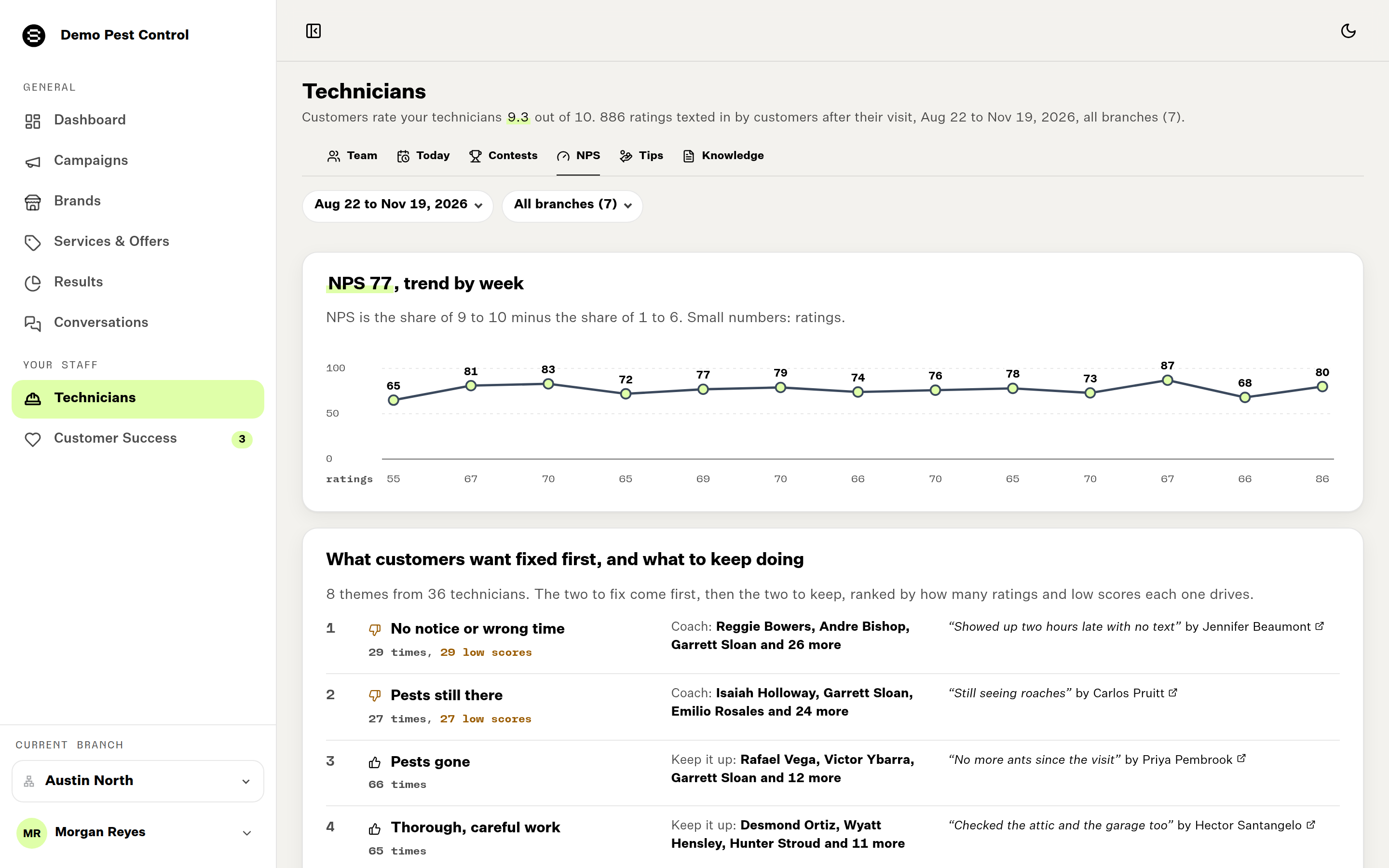
OfficeThe field manager opens Technicians > NPS and reads the Keep doing and Fix highlights.
By hand and in Sellify
What the customer sees
One friendly text the day after service, in the thread they already know from the reminder. If they reply with a problem, the conversation continues and a person on your team follows up.
What your office sees
- Customer Success > Tasks: complaints, for example as a Service Complaint task, with the triggering message.
- Technicians > NPS: a ranking and per-technician insights.
- Conversations: every follow-up thread, word for word.
What you control
- Follow up after the visit: Yes / No, in the reminder campaign setup (Strongly recommended).
- Technician NPS is filled by these answers. Without Smart Appointment Reminders, the NPS tab offers to launch them.
What stays with your team
The fix. Sellify AI asks the question and routes the answer. Calling the unhappy customer, sending a technician back and deciding what to offer stay with your office.
Related
- Guide: Pest control follow-up after treatment: catch problems early
- Smart Appointment Reminders
- Customer Success Tasks
- Technician NPS
- Back to Office and customer service and the pillar guide How to keep recurring pest control customers
Questions
How do I turn it on?
When does the customer get the text?
Where do complaints go?
Where do the ratings show?
Sellify AI does this texting and call answering for pest control companies. See how it works, or book a walkthrough. Already a client? Ask your account manager.
Sources
- Sellify AI product documentation