What it does
You run a contest for one branch and its technicians see the standings on their phones. Contests does not decide what is fair across routes: you pick the goal, and a jobs-done contest can be hard on techs with long drives.
- A contest in a few fields: what wins, the branch, start and end dates, and prizes.
- Standings on the phone: each technician sees the contest under Earnings in Sellify Tech.
- Payouts without a spreadsheet: the winners are paid when the contest ends, and Past contests shows who won and what each was paid.
Where things are
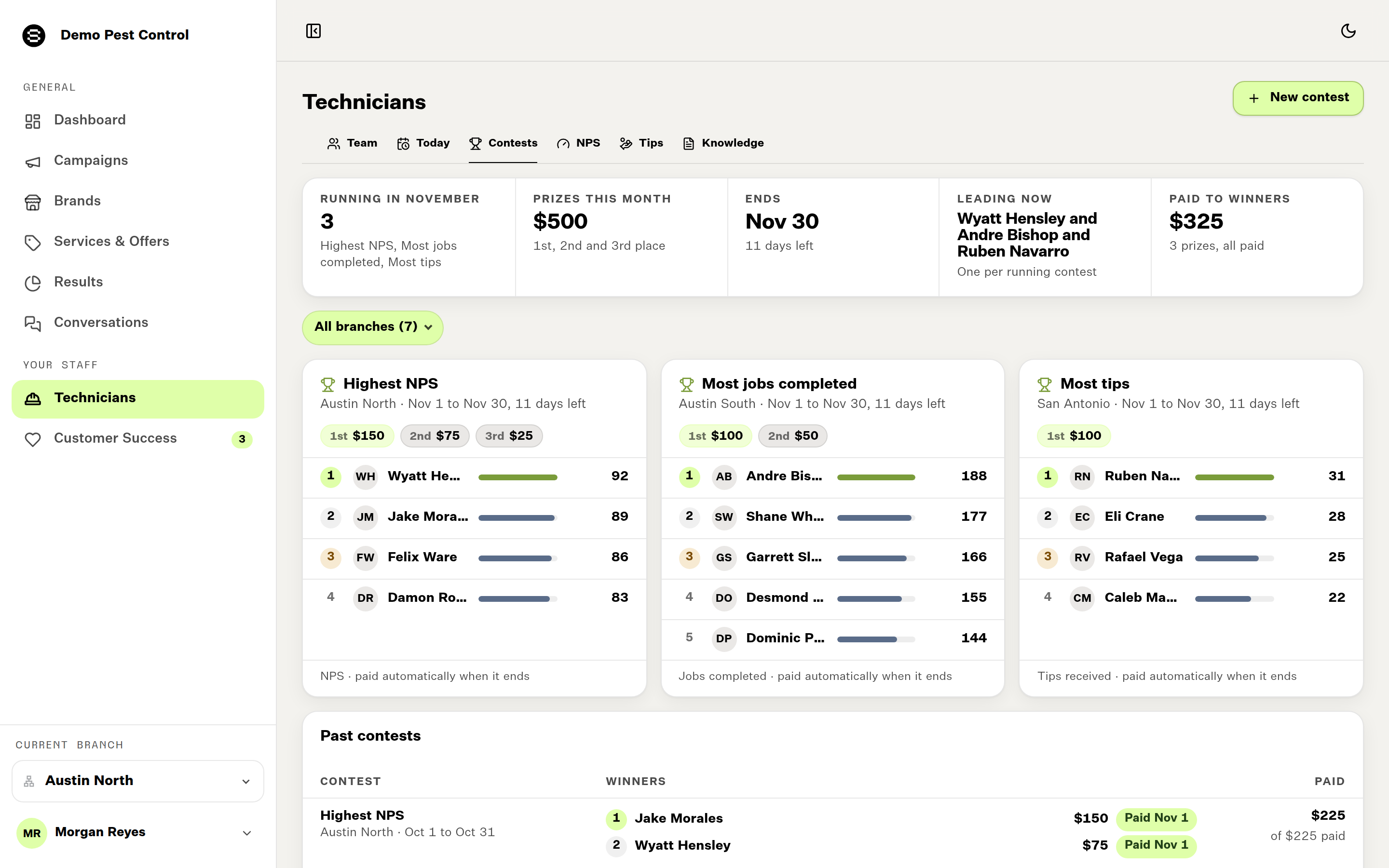
- 1At a glance: Running in November, Prizes this month, Ends and Leading now.
- 2New contest.
- 3Each contest: its branch, its dates, the prizes and the leaderboard, such as Most tips.
- 4Past contests: winners and what each was paid.
Contests can use ratings from Technician NPS, which come from customers' answers after each visit. So a contest on ratings rewards the visits customers liked.
What good looks like
Aim for one clear goal per month that every technician in the branch has a fair chance to win, with prizes you can pay every month, not only once. A contest techs believe is fair keeps them looking at the standings; one that favors short routes does the opposite.
Numbers to watch:
- Ratings from Technician NPS by tech, before and during the contest.
- Jobs done per tech, and whether the gap between routes narrows.
- How many techs open the standings in Sellify Tech.
What the technician sees
Under Earnings in Sellify Tech: the running contest, where they stand, and prizes they have won, next to their tips.
What your office sees
Technicians > Contests: running contests, prizes this month, who leads now, and Past contests with winners and amounts paid.
What you control
- New contest: what wins, the branch, the start and end dates you pick, and prizes for first, second and third, in whole dollars.
- Who takes part: the technicians of the branch you pick. Invite them to Sellify Tech from Technicians > Team so they can see their place.
What stays with your team
How contests fit your pay plan, and how you celebrate the winners. Ask your accountant how prizes should be handled for payroll and taxes.
Related
Technicians hub
For technicians and the owners who keep them: guides on training, retention and tips, plus what the Sellify Tech pest control technician app shows on a phone.
Pest control technician retention: 7 habits that keep techs
Too few technicians holds back many pest control companies. Seven retention habits that keep good techs: a clear day, fair feedback, recognition, visible pay.
Tipping pest control technicians: how to offer it fairly
Should customers tip pest control technicians? How to offer tips without pushing customers, keep it fair across routes, and make sure the money reaches techs.
Update: tips, contests and knowledge for technicians
Three new tools under Technicians: customers can tip their technician, the office runs contests per branch with prizes, and techs get answers from your files.
Questions
What can a contest be about?
How are prizes paid?
Where do technicians see the standings?
How many places can win?
Sellify AI does this texting and call answering for pest control companies. See how it works, or book a walkthrough. Already a client? Ask your account manager.
Sources
- Sellify AI product documentation