What it does
You read what Sellify AI said to each customer, word for word, in one list. One switch hands a conversation to a person, and the opportunity, win chance and sale record sit next to the words. Once you turn Sellify AI replies off, it stops answering that customer until you turn it back on, and the thread is your team's.
What your office sees
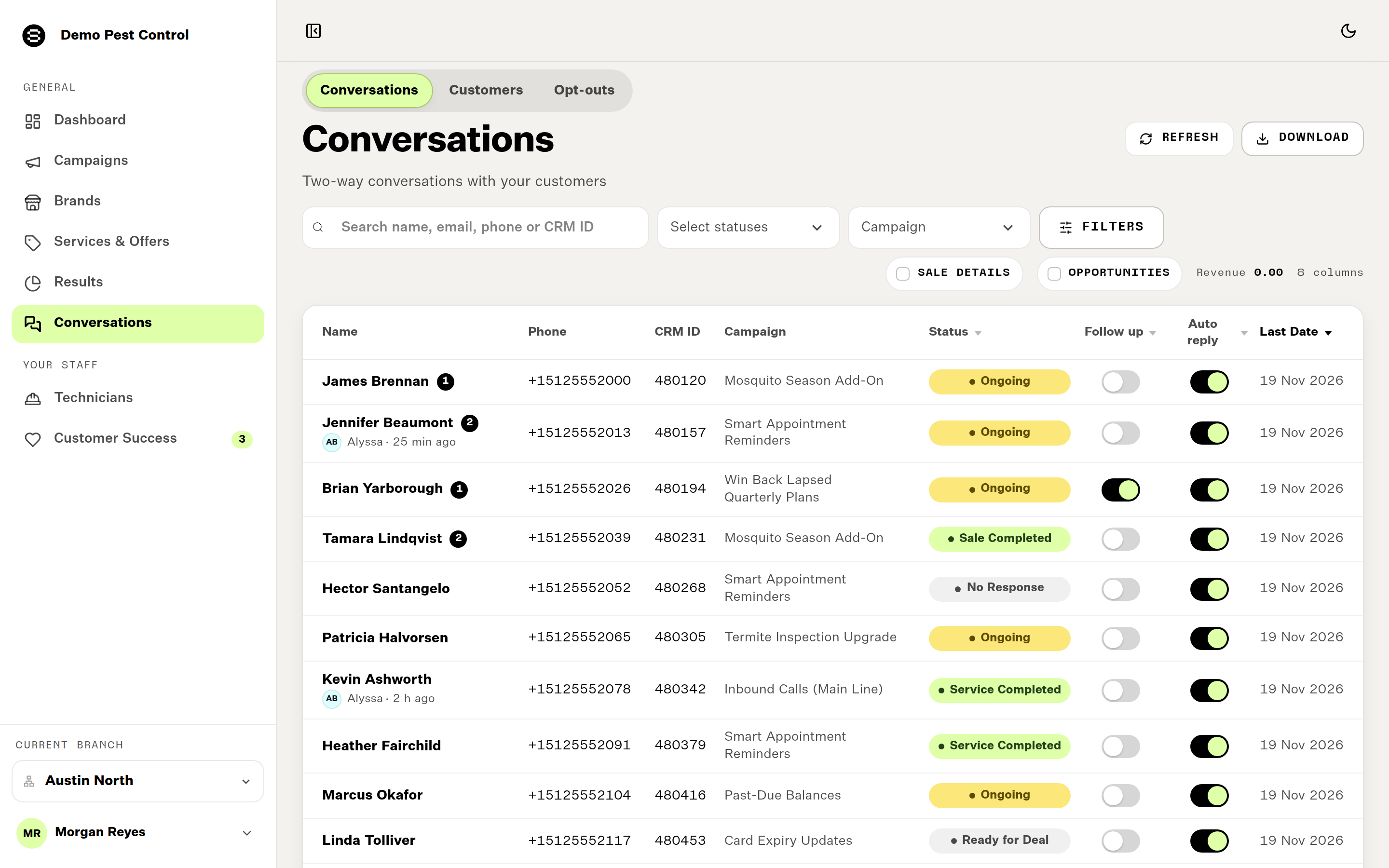
- 1Search by name, email, phone or CRM ID.
- 2Filters, next to the Select statuses and Campaign pickers.
- 3Tabs for Customers and Opt-outs sit next to Conversations.
- 4Auto reply: on when Sellify AI is replying.
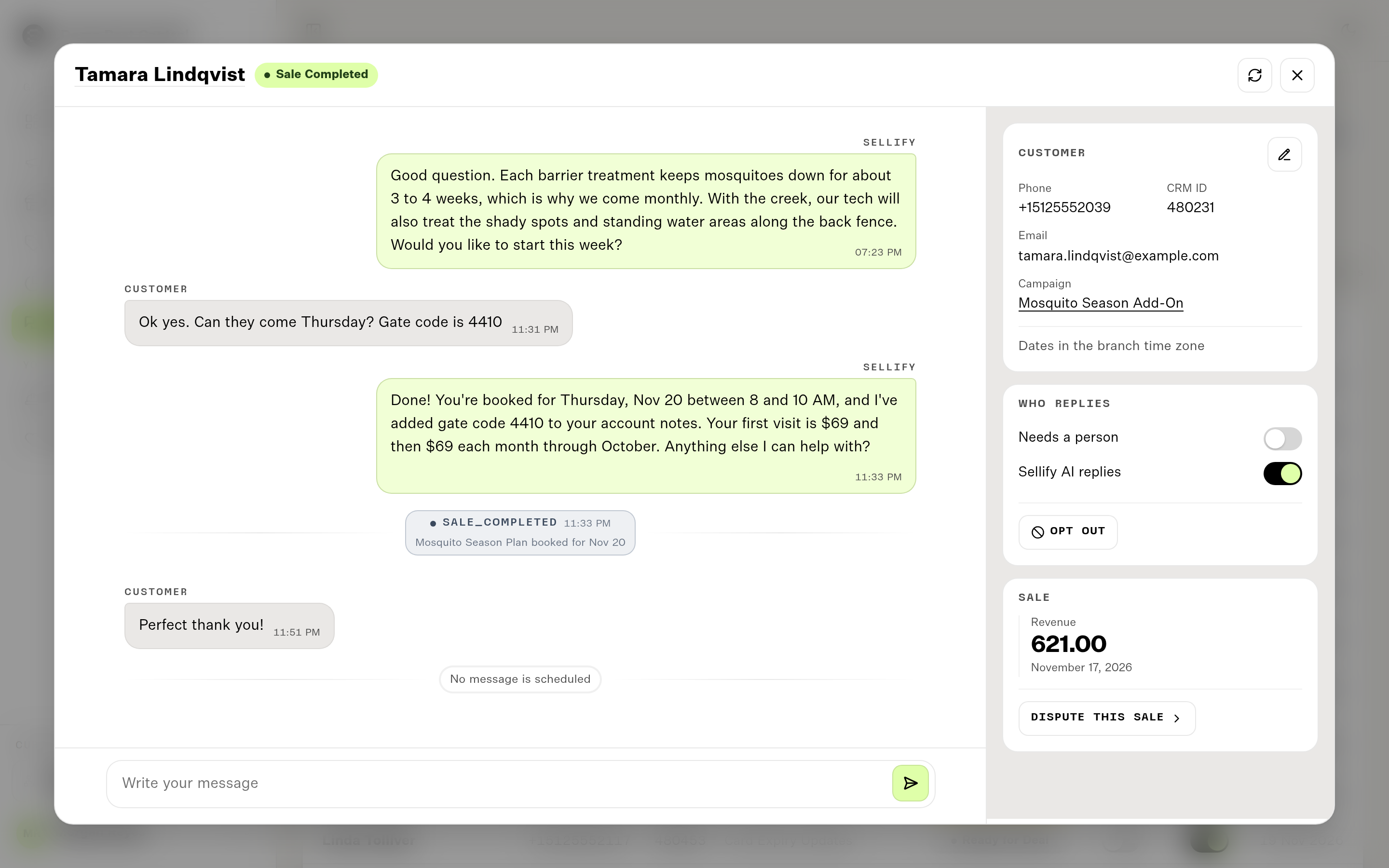
Open a conversation and the detail panel shows the customer, the opportunity with its win chance, the Who replies card with its Sellify AI replies and Needs a person switches, the sale record, notes, a link to the conversation's task if it has one, and the avatars of the colleagues who opened it before you.
What the customer sees
A normal text conversation with your company. When your team takes over, the customer keeps texting the same number.
Myths about AI texting
Once the AI starts texting, you cannot step in.
Any conversation can be taken over at any time by turning off Sellify AI replies in the Who replies card.
Source: Sellify AI product documentationYou never really know what the AI told a customer.
Each conversation is in Conversations, word for word, and searchable by name or phone.
Source: Sellify AI product documentationThe AI tries to handle everything, even a customer who wants to cancel.
When a person is needed, Sellify AI files a task for your office in Customer Success Tasks.
Source: Sellify AI product documentationAI texts go out at any hour.
Sales texts and service texts each follow the hours you set in Settings > Quiet hours.
Source: Sellify AI product documentationTwo people will end up answering the same customer.
Each conversation shows who has opened it and links to its task, so the team can see who is on it.
Source: Sellify AI product documentationWhat you control
- Sellify AI replies, in the Who replies card of each conversation: on, or off when a person takes over.
- Notes on the conversation for your team.
- Which conversations you see, using the filters above.
What stays with your team
Anything you decide to take over. Sellify AI answers the routine back and forth; your team can step in whenever a conversation needs judgment, and the handoffs Sellify AI creates on its own go to Customer Success Tasks.
Related
- Customer Success Tasks
- Texts reach the customer's next phone number
- Customers and opt-outs
- Guide: Pest control office handoffs: run them as one queue
- Update: Conversations: search and who viewed
- Back to Office and customer service and the pillar guide AI for pest control companies
Questions
Can my team step in on a conversation?
Can I search for one customer?
How do I avoid two people answering the same customer?
What does Win chance mean?
Sellify AI does this texting and call answering for pest control companies. See how it works, or book a walkthrough. Already a client? Ask your account manager.
Sources
- Sellify AI product documentation