What it does
You set once per role who hears about what, and each person can adjust their own. Routine items wait for the morning summary, and payment failures and a negative balance reach you with no switch to turn them off. It does not do the work in an alert: handoffs that need a person sit in Customer Success Tasks.
What your office sees
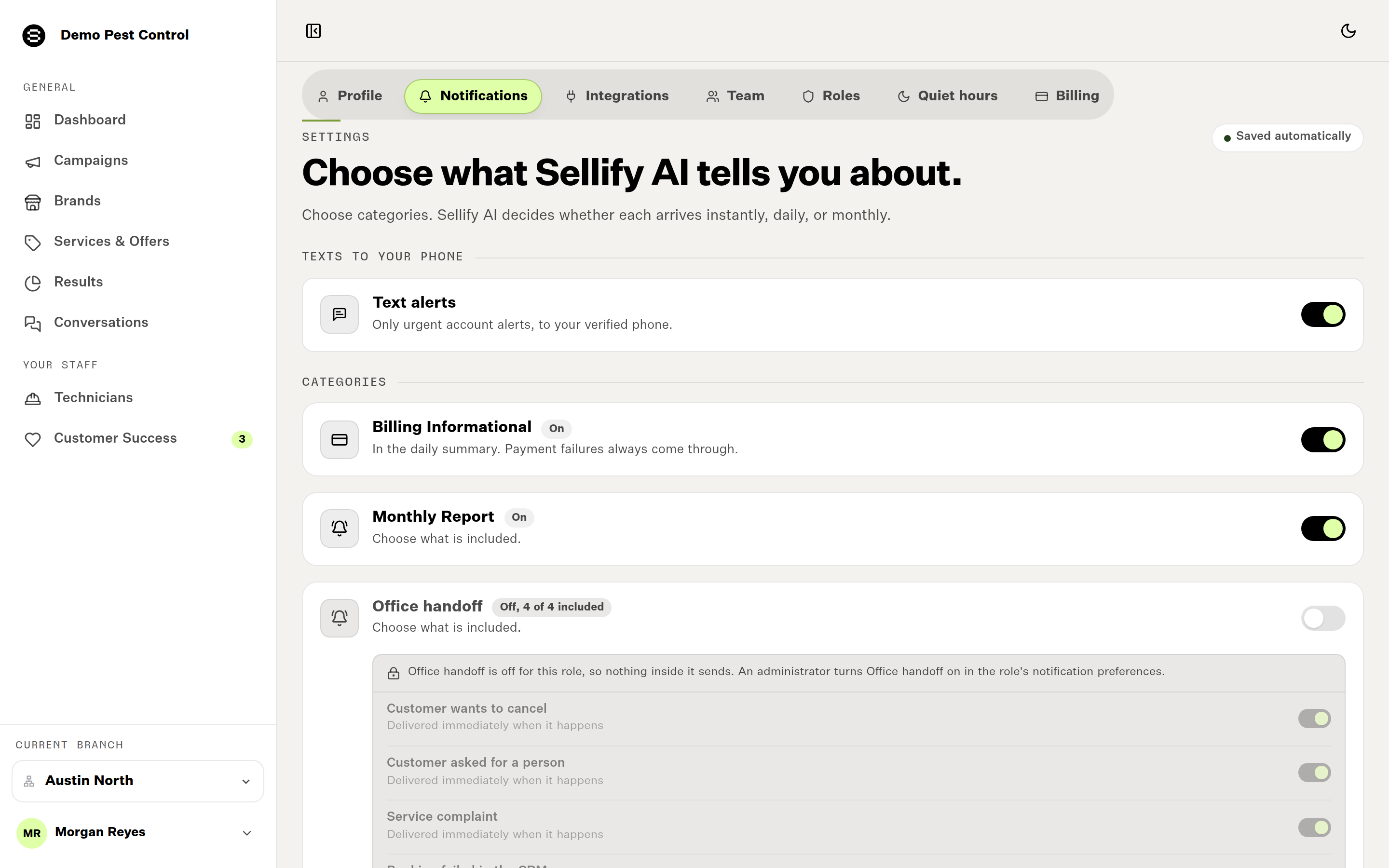
- 1Text alerts: only urgent account alerts, to your verified phone.
- 2Billing Informational: in the daily summary. Payment failures still come through.
- 3Office handoff: lists Customer wants to cancel, Customer asked for a person and Service complaint. Here the category is off for this role.
The categories you see depend on your account and role. Others include Sales and Customer service, where Sellify decides whether each item needs you now or can wait for the morning summary, and Campaigns, with Campaign updates (approved, canceled, started, out of audience) and Action required (campaigns waiting on someone).
What you control
- Category switches per role, with overrides per person.
- Campaign updates and Action required for campaigns.
- Text alerts for urgent account issues: on or paused.
Always sent, with no switch: Urgent account alerts (payment failures and a negative balance) and Login and account emails (password resets, invitations and email verification).
What good looks like
Aim for each alert to reach the one person who acts on it that day, and for everyone else to get the picture from the morning summary. An inbox full of alerts nobody owns is how a cancel request or a stuck campaign gets missed.
Numbers to watch:
- Open items in Customer Success Tasks each morning, and how many are older than a day.
- Campaigns waiting on someone, and how long they wait.
- Payment failures, and how quickly each one is followed up.
What the customer sees
Nothing. Notifications are for your team only.
What stays with your team
Acting on the alert. Handoffs that need a person live in Customer Success Tasks, which also sends its own regular task digest by email.
Related
- Customer Success Tasks
- Quiet hours, days off and follow-up limits
- Team and Roles
- Campaigns
- Guide: Pest control office handoffs: run them as one queue
- Back to Owners and the pillar guide Pest control software: a small business buyer's checklist
Questions
Can each person change their own notifications?
Will I get an email for every item?
Which emails can I not turn off?
Can urgent alerts come by text?
Sellify AI does this texting and call answering for pest control companies. See how it works, or book a walkthrough. Already a client? Ask your account manager.
Sources
- Sellify AI product documentation