What counts as a handoff
A handoff is any moment where a customer needs a person. In a pest control office, most fall into a short list:
- A customer wants to cancel.
- A complaint about a visit or a technician.
- A reschedule nobody could fit.
- A billing question or a disputed charge.
- A promised call back.
- A customer ready to buy an add-on or ask for a quote.
Write your own list down. If your team cannot name the kinds of handoff, they cannot sort them.
The four parts of a good queue
- One place. Every handoff goes into the same list, no matter where it came from: phone, text, email, the technician.
- Three urgency levels. Now (a cancel), today (a reschedule, a sale waiting on you), can wait (a call back). Decide the level when the item is created, not when someone gets around to it.
- An owner per item. Assign by branch or by kind. A name, not "the office".
- A status. Open, waiting on the customer, done. "Waiting on the customer" matters: it stops people from chasing items that are not theirs to move.
Then add the habit: work the queue at the same time every morning, urgent first, and close what is done.
A day of handoffs
Example: one day of handoffs at Demo Pest Control, run by hand
Example data. Invented branch, people and items. The queue here is a shared spreadsheet.
- 7:45
Morning sort
OfficeDana opens the shared sheet: 2 Now, 5 Today, 3 Can wait. She filters to her branch.
- 8:00
Now items first
OfficeTwo cancel requests. She calls both before 9. One stays with a return visit, one is moving. Both rows get an outcome and go to done.
- 10:30
A handoff from the field
TechnicianA tech texts that a customer asked about termite inspection. Dana adds a Today row: kind 'sale', owner Sam.
- 12:00
Waiting on the customer
CustomerA billing question needs the customer to send a receipt. Dana sets the row to waiting so nobody calls twice.
- 15:00
Can wait
OfficeSam clears two call backs promised yesterday.
- 17:00
End of day check
OfficeThe owner looks at one number: Now items still open. It is zero.
A shared spreadsheet works for a few dozen items a week. It breaks when items come from many places at once, or when the person who writes the row is not the person who saw the problem.
What good looks like
A working queue shows up in a few numbers you can read every week, whatever tool you use.
- Nothing urgent left overnight. Aim for zero cancel requests and complaints still open at the end of the day. Watch urgent items open at 5 PM.
- Every item has a name on it. Aim for no item without an owner, including on days off. Watch unowned items each morning.
- Fast first contact. Aim to reach the customer the same day for anything urgent or due today. Watch the time from a handoff to the first call or text.
- A visible closed count. You should be able to say how many handoffs the office finished last week. Watch closed items per week next to new ones.
- Fewer repeats. Once a month, read the closed items for patterns: one route, one tech, one kind of complaint. Watch whether the same kind of handoff shrinks after you fix its cause.
If you only start with one thing, give each branch one list and one owner this week, then put the four parts of a good queue in place in order.
Common failure points
- Escalation by email. It arrives in five inboxes, everyone assumes someone else has it.
- No reason on the item. "Call Mrs. Smith" without why means a second call to find out.
- Owner by default. Whoever answered the phone owns it, even if they work a different branch.
- No closed count. If you cannot see what got done, the queue only ever looks like a backlog.
The two handoffs that matter most are covered in Pest control cancellation: what to do in the next hour and Pest control follow-up after treatment. For the bigger picture, read How to keep recurring pest control customers, or go back to the Office and customer service hub.
Questions
What is a customer handoff in a pest control office?
Why not just forward emails?
How many priority levels do we need?
Who should own handoffs when the office is small?
If you use Sellify
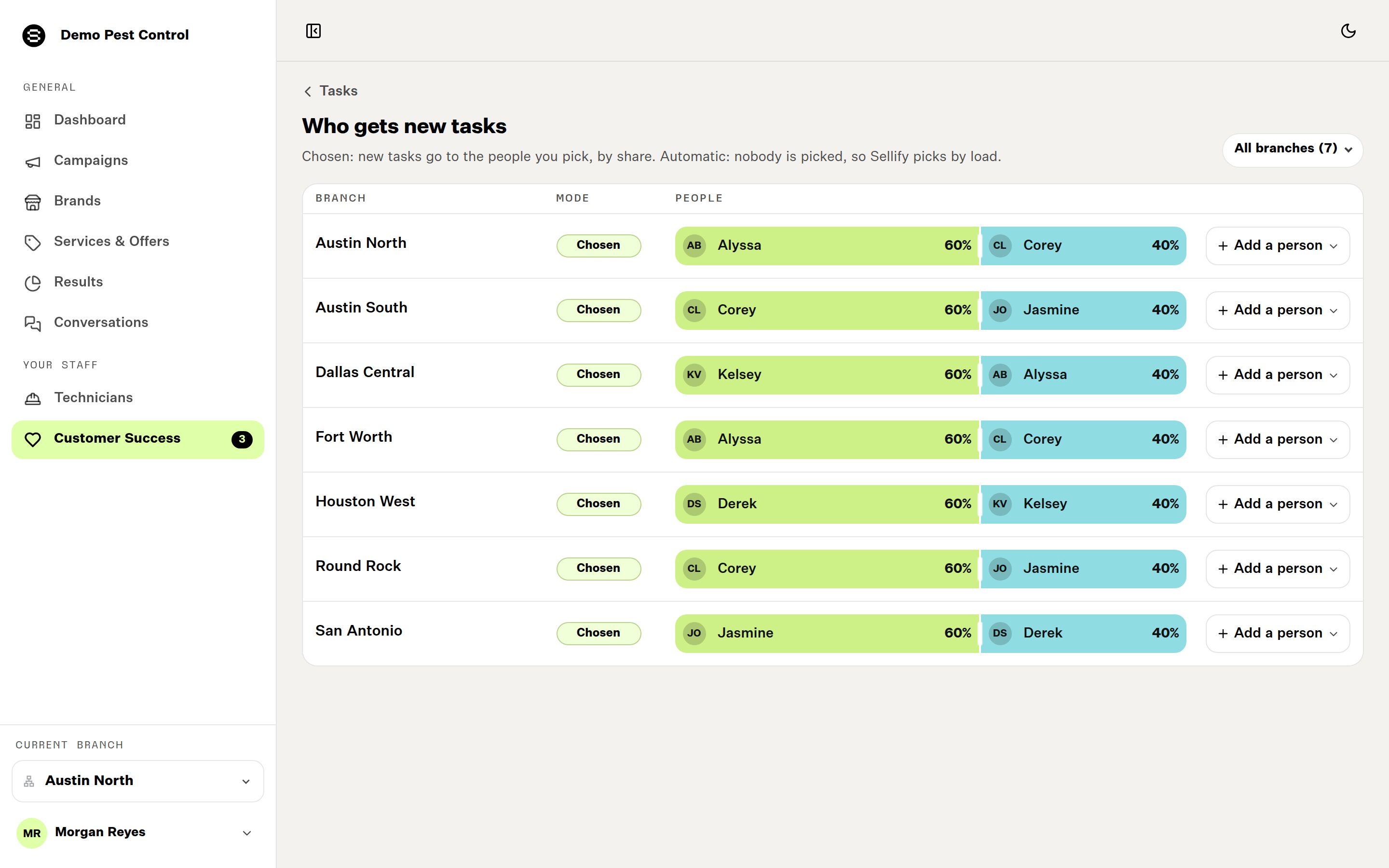
Sellify does not work the queue; your people still make the calls. It fills the queue. When a conversation needs a person, it files a task with the reason, a summary of what to do and the customer's data, sorted as urgent, today or can wait. Tasks go to the people you pick for each branch, and staff can text the customer from the task and mark it waiting on the customer or done. Conversations your team takes over in Conversations show up there too, and Notifications set who hears about what.
Write down your kinds of handoff, then give each branch one named owner and a backup for days off.
Sellify AI does this texting and call answering for pest control companies. See how it works, or book a walkthrough.
Sources
- Sellify AI product documentation