What it does
Your customer says yes and gets the agreement in the same conversation, and your office sees the sale and the first visit in the CRM without retyping them. A sale can stall at the paperwork: the agreement goes out days later, or a busy rep forgets to book the first visit. Closing in the thread keeps it in one place, from the yes to the visit on the schedule. It works for new callers answered by Inbound Voice, old quotes and past customers from Win Backs, and add-ons from Upsells and Cross Sells. One limit: how much can be written back depends on your CRM, and a step that cannot be finished goes to your office as a task.
The path of one sale
A worked example with Demo Pest Control. The customer and times are made up.
- Tue 10:14
Says yes
CustomerA Demo Pest Control customer replies that they want the mosquito plan offered in their thread.
- Tue 10:15
Sends the agreement
Sellify AIThe agreement link for that offer arrives in the same thread.
- Tue 18:40
Signs
CustomerThe customer signs on their phone after work.
- Tue 18:41
Writes it to the CRM
Sellify AIThe sale and the first visit are written to the CRM, following the closing flow set on the offer.
- Wed 08:00
Sees the signed sale
OfficeThe sale is in Results. If any step could not be finished, it would be a task in Customer Success > Tasks instead.
What the customer sees
An agreement link in the thread they are already in, from your company's number. They sign on their phone. They do not have to call the office, print anything or wait for an email.
What your office sees
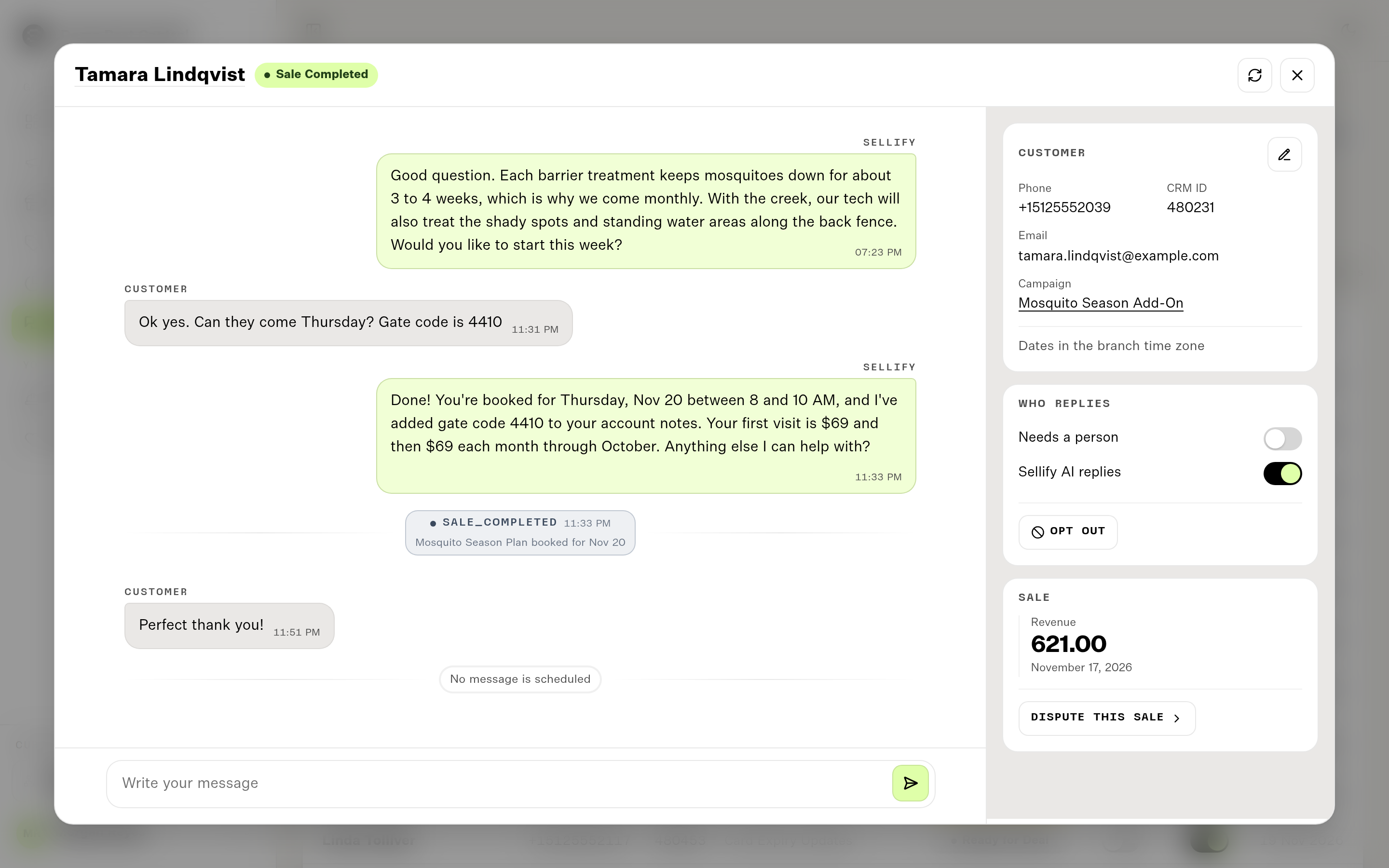
- 1Sale Completed: the conversation ended in a sale.
- 2The booking shows in the thread: Mosquito Season Plan booked for Nov 20.
- 3The Sale panel: Revenue, the date and Dispute this sale.
Conversations
Sale stages for every thread, with a Sale stages filter.
Results
Signed sales. For calls answered by Inbound Voice, agreements still open show as Agreement sent, not signed yet.
Customer Success > Tasks
Any sale that needs a person to finish it.
What you control
- The CRM tab of each offer in Services & Offers: the closing flow (Sign the agreement, Get payment info, Book the visit) and the contract form, where your CRM supports it.
- Which offers are sold, and at what price, on the other tabs of the same offer.
How much Sellify can write back varies by CRM. We confirm exactly what your CRM supports on the walkthrough, before you sign anything. See Integrations.
What stays with your team
Any sale that cannot be finished by text, a contract question outside the offer, and any customer who asks for a person.
Related
Pest control leads: from first call to first visit
Turn a new pest control caller into a first visit: answer the call, quote on first contact, follow up open quotes, revive old ones, then score how you do.
Pest control add-on services: how to sell a second service
Which add-on services to offer, who to offer them to, what a good offer covers, and how to work out what a season of add-on sales is worth to your company.
How to grow a pest control business
How to grow a pest control business: answer new callers, follow up quotes, sell a second service, win back past customers and hire before the work outruns you.
Sales and revenue
Pest control sales start in three places: a new caller, a quote nobody followed up, and a customer who could use a second service. Guides for each, in order.
Questions
How does the customer sign?
Does my office still type the sale into the CRM?
What if the customer does not sign?
Which contract does the customer get?
What happens when a step fails?
Sellify AI does this texting and call answering for pest control companies. See how it works, or book a walkthrough. Already a client? Ask your account manager.
Sources
- Sellify AI product documentation