How it works · Sales

Upsells and Cross Sells: add-on sales to pest customers

Upsells and Cross Sells finds current customers who fit an add-on, offers it by text, answers the price and contract questions, and signs them up. In the app the campaign goal is Upsell, and the results show as Upsells on the Dashboard.

Contents
  1. What it does
  2. By hand and in Sellify
  3. What the customer sees
  4. What your office sees
  5. What you control
  6. What stays with your team
  7. Related
  8. Questions
  9. Sources

What it does

You choose the add-on, the price and how much room there is on it; Sellify AI offers it only to current customers who fit and only at the terms you set. It makes the offer for a service such as mosquito, termite, rodent or lawn, answers questions on price and contract, sends the agreement and books the visit in your CRM. It does not invent services or discounts, and anything it cannot finish goes to your office as a task.

A campaign can run as a seasonal push, or tied to a customer's next scheduled visit. Sellify AI decides when to text and follows the reply.

By hand and in Sellify

Before and after
By handA rep exports current customers to a spreadsheet each spring.
In SellifyYou start an Upsell campaign and pick the audience from your CRM.
By handA technician mentions mosquito service to a customer on the porch. This works well by hand.
In SellifyThe same conversation can still happen at the door; the text offer reaches the customers nobody spoke to.
By handTexts go out when someone has a free hour.
In SellifySellify AI texts customers who fit the add-on, inside the hours you set.
By handPrice questions wait for a manager.
In SellifySellify AI quotes the price and discount you set on the offer.
By handFollow-ups stop when the week gets busy.
In SellifySellify AI follows up within the limits you set.
By handA yes waits for paperwork and data entry.
In SellifyThe agreement goes out in the thread; the sale and visit are written to your CRM.

What the customer sees

A friendly two-way text from your company, signed with the sales rep name you set. They can ask what the service includes, what it costs and how the contract works, and get a straight answer. When they say yes, the agreement link arrives in the same thread. See Contracts and closing in the thread.

What your office sees
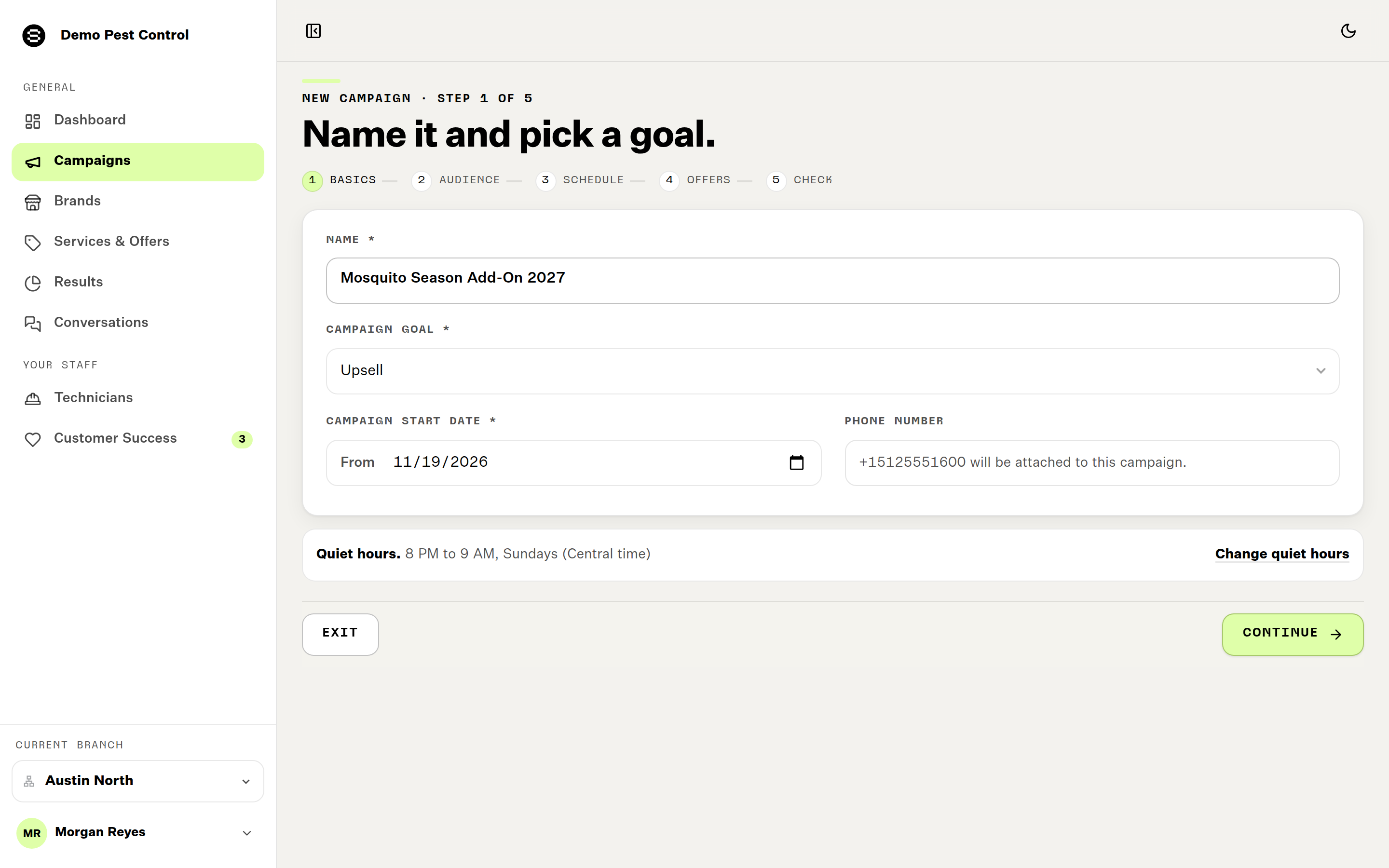
Screen tour
app.sellifyai.com
New campaign step 1 in Sellify for Demo Pest Control: the name Mosquito Season Add-On 2027, Campaign goal Upsell, Campaign start date and Phone number123
  1. 1Campaign goal: Upsell.
  2. 2Campaign start date.
  3. 3Phone number: the number the campaign texts from.
New campaign step 1 in Sellify for Demo Pest Control: the name Mosquito Season Add-On 2027, Campaign goal Upsell, Campaign start date and Phone number
How it works · Office and billing

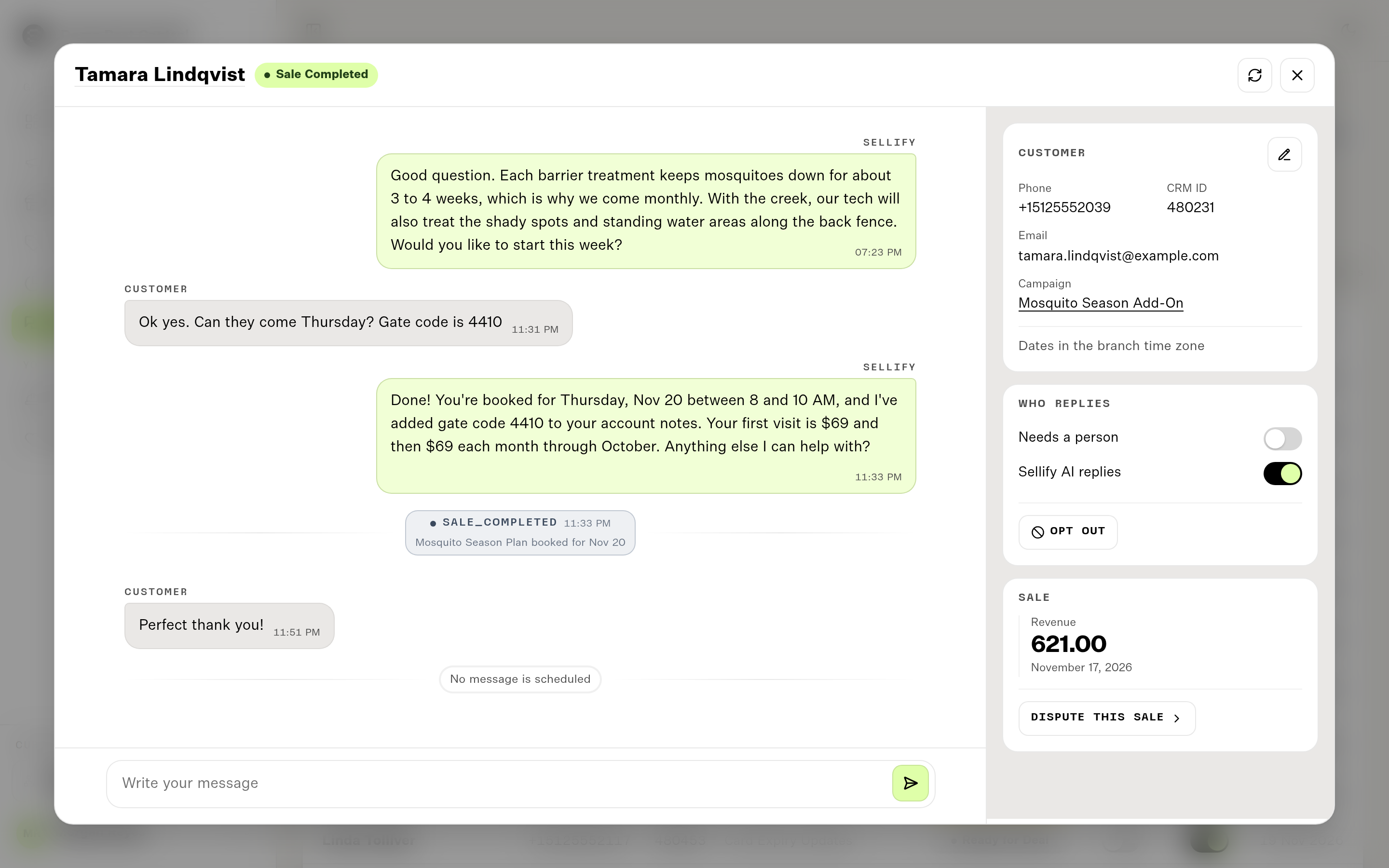
Conversations

Every thread, with Sale stages and Win chance filters. Staff can take any conversation over.

Read
How it works · Office and billing

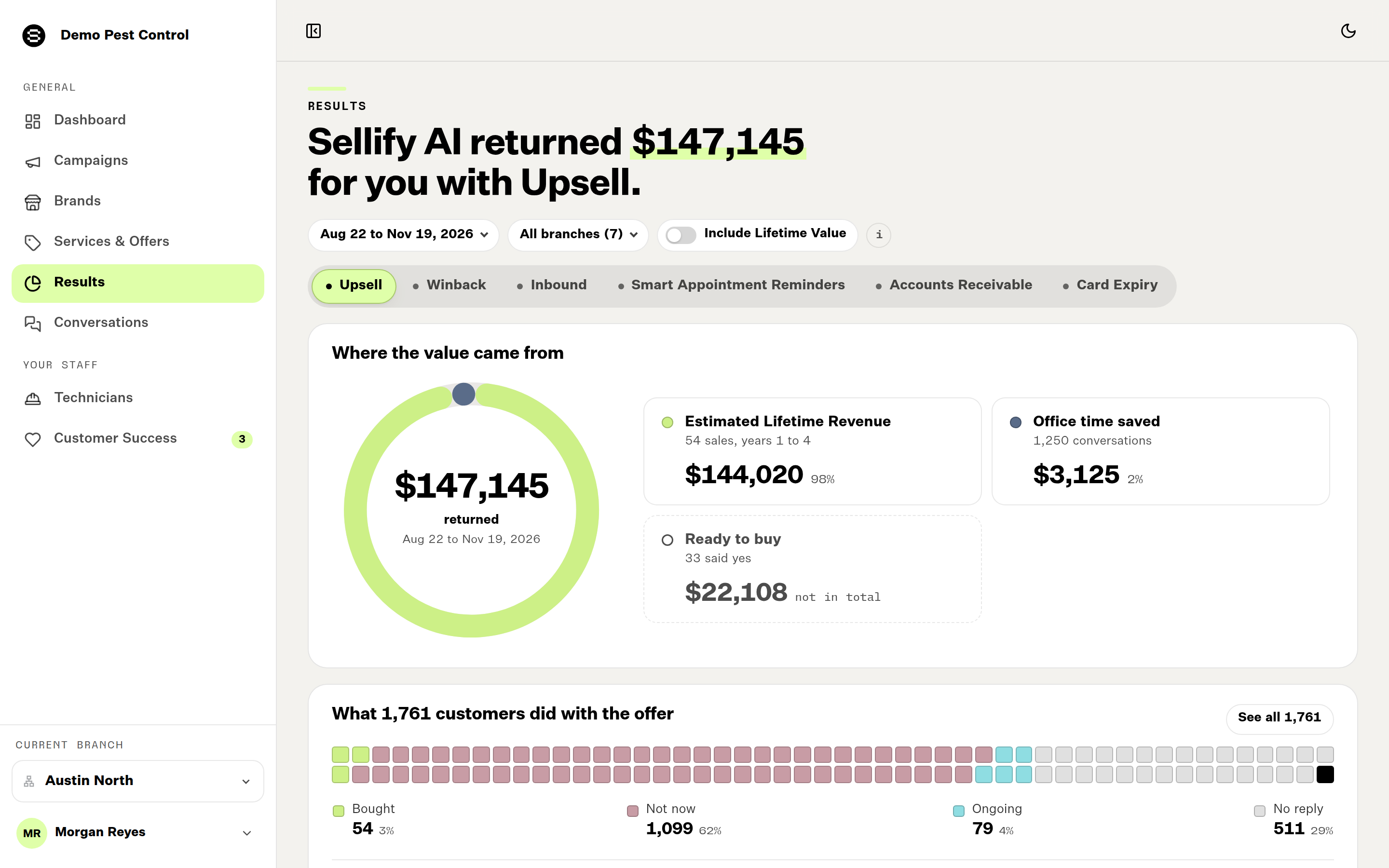
Results

What customers did with the offer, filtered by date and branch. Open Results from a campaign to see that campaign alone.
Read
How it works · Office and billing

Dashboard

Upsells next to your other use cases.

Read
How it works · Office and billing

Customer Success > Tasks

The items that need a person.

Read
app.sellifyai.com
An open upsell conversation in Sellify for Demo Pest Control, marked Sale Completed: a mosquito add-on booked by text, the Who replies switches and the Sale panel with Revenue, the date and Dispute this sale
app.sellifyai.com
Results for Demo Pest Control on the Upsell tab, Aug 22 to Nov 19, 2026, all branches: the value returned, where the value came from and what 1,761 customers did with the offer

What you control

The campaign's goal, audience, start date and phone number in Campaigns; the add-on, its price and the discount you allow in Services & Offers; the hours sales texts may go out and your follow-up limits in Quiet hours; and how each brand presents itself in Brands.

What stays with your team

Anything outside the offer you set, a customer who asks for a person, and any step Sellify AI cannot finish. Those reach your team in Customer Success > Tasks.

Questions

Which services can Sellify AI offer as an add-on?
The services you set up in Services & Offers, for example mosquito, termite, rodent or lawn. Sellify AI only offers what is there, at the price you set.
Can Sellify AI give a discount?
Only the discount you allow on each offer for upsell conversations.
Who does the customer think they are texting?
Your company. Texts come from your number under the sales rep name you choose for each brand in Brands.
Can my team step in on a conversation?
Yes. Every thread is in Conversations, and staff can take one over at any time by turning off Sellify AI replies in the Who replies card.
What if a sale cannot be finished by text?
It becomes a task in Customer Success > Tasks, with the reason and the customer's details, so a person can finish it.

Sellify AI does this texting and call answering for pest control companies. See how it works, or book a walkthrough. Already a client? Ask your account manager.

Sources

  1. Sellify AI product documentation