Part of the Billing and collections hub. For the habits behind it, with or without software, read collecting past-due balances without losing the customer.
What it does
Your customers with a past-due balance hear from you by text, politely, before anyone on your team picks up the phone. It does not argue a dispute or agree to terms outside your normal ones; those go to a person.
- Payment by secure link, or by the card on file when the customer says so, where your CRM supports it.
- Disputes, "I already paid" and anyone who wants a person go to your team.
- Once the whole balance is paid, a one-time $10 credit for adding a backup card and autopay, if either is missing, where your CRM supports it.
- One campaign for the whole company. Accounts Receivable is a global campaign: you set it up once and add the branches it covers.
The path of one balance
Example: one past-due balance at Demo Pest Control
Example data. The customer, amount and replies are invented.
- Past due
A balance goes past due
OfficeA quarterly visit at Demo Pest Control was done, but the $118 charge was never paid. The balance shows as past due in the CRM.
- First text
A clear balance text
Sellify AIThe customer gets a text from Demo Pest Control's number with the open amount and a secure link to pay.
- Reply
"Can it wait until Friday?"
CustomerThe customer explains they get paid on Friday. Results tracks this as Promised to pay, and Sellify AI follows up if the balance is still open.
- Payday
Paid by link
CustomerThe customer opens the link and pays.
- Recorded
Outcome in Results
OfficeThe conversation shows as Paid in Results. Had the customer disputed the bill, a task would have reached Customer Success > Tasks instead.
What the customer sees
- A short text from your company's number about the open balance, with a secure link.
- Plain answers when they ask what the charge is for.
- The choice to pay with the card on file, where your CRM supports it.
- A person from your team when they say the balance is wrong or ask for one.
Sellify AI follows up if the balance is still open.
What your office sees
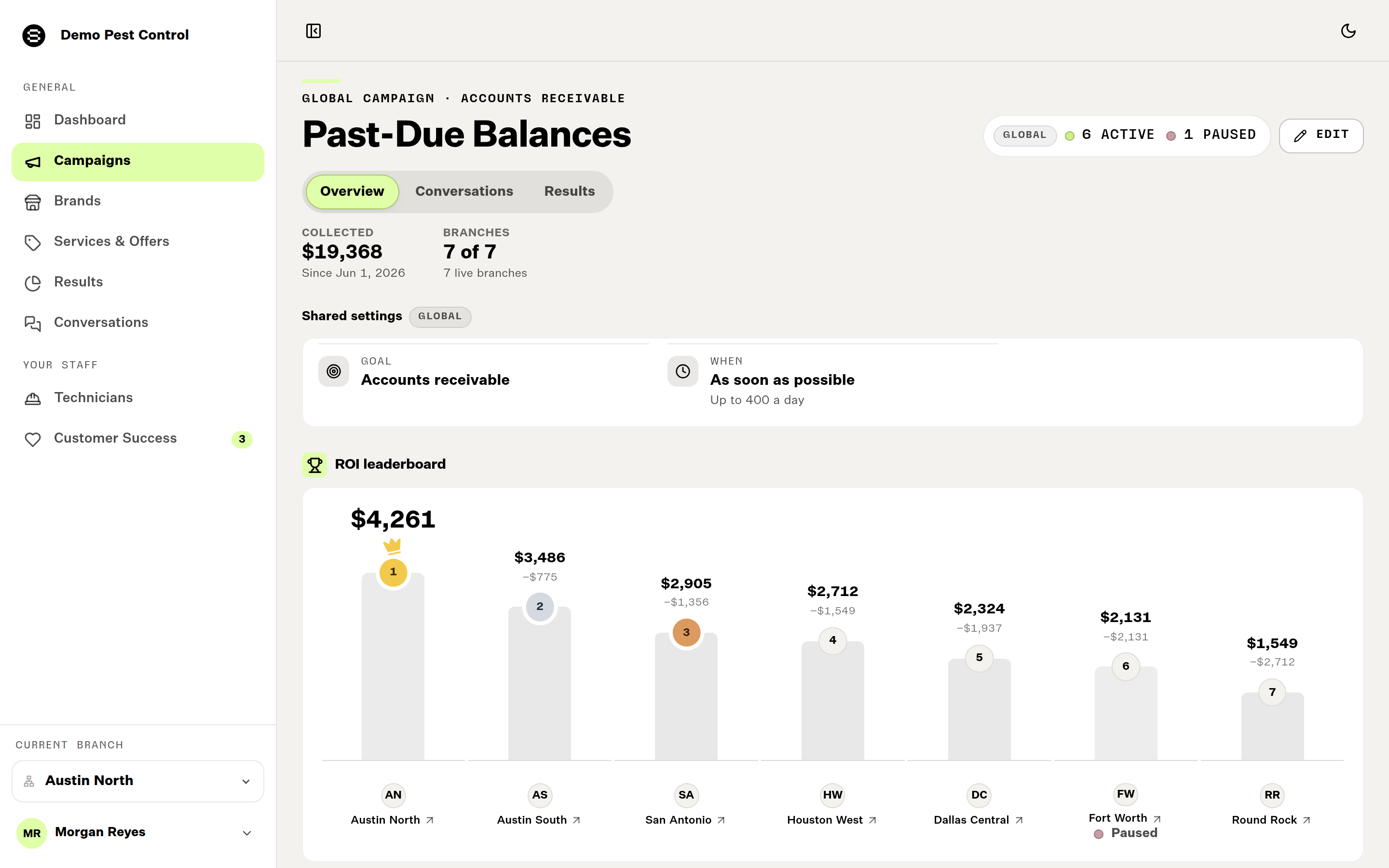
- 1Overview, Conversations and Results for this campaign.
- 2Collected so far, and how many branches are live.
- 3ROI leaderboard: what each branch brought in.
- Results: outcomes such as Paid, Refused to pay and Disputed the bill, with Promised to pay tracked along the way. Filter by date and branch, or open Results from the campaign to see it alone.
- Conversations: every Accounts Receivable conversation, word for word. Staff can take one over at any time.
- Customer Success > Tasks: disputes and other handoffs in one queue, sorted Urgent, Today and Can wait.
- Campaigns: the Accounts Receivable campaign page shown above. If your organization already runs one, the goal shows "(your organization already has a global one)".
- Dashboard: the value of Accounts Receivable next to your other use cases.
What you control
How long follow-ups continue on an old balance and the hours these texts may go out, both in Quiet hours; how each brand presents itself, in Brands; and who replies on any conversation, so a person can take over at any time.
What stays with your team
Disputes, payment arrangements outside your normal terms, customers who want to cancel, and anyone who asks for a person. Sellify AI's job is to reach people, explain the balance and make paying easy. Judgment calls stay with you.
Related guides
- Collecting past-due balances without losing the customer
- Expired cards: the quiet way autopay customers leave
- A customer wants to cancel: what to do in the next hour
- Related product pages: Expiring Credit Cards, Customer Success: Tasks, Results, Conversations, Quiet hours, days off and follow-up limits, Campaigns
Questions
How does the customer pay?
What happens when a customer disputes the balance or says they already paid?
Do I set it up branch by branch?
Will it text customers late at night?
Can my team see and take over these conversations?
Sellify AI does this texting and call answering for pest control companies. See how it works, or book a walkthrough. Already a client? Ask your account manager.
Sources
- Sellify AI product documentation